The slider control we shared today has a very high degree of customization, especially the use of the 3D features of CSS3, which makes the entire slider control more cool.
Advertisement
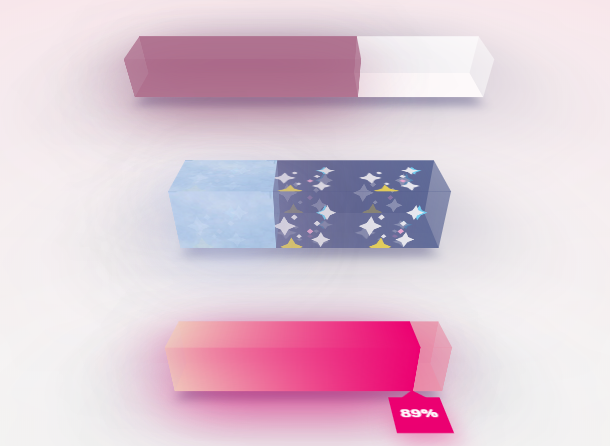
<h1>Scalable <b>3D</b> Range Sliders</h1>

<main class="perspective" id="first-bar">
  <section class="bar">
    <div class="bar-face back percentage"></div>
    <div class="bar-face floor percentage"></div>
    <div class="bar-face roof percentage"></div>
    <div class="bar-face front percentage"></div>
  </section>
  <input class="bar-input" type="range" min="0" max="101" value="64" />
</main>
<p>Simple Range</p>


<main class="perspective" id="second-bar">
<section class="bar">
    <div class="bar-face back percentage"></div>
    <div class="bar-face floor percentage"></div>
    <div class="bar-face roof percentage"></div>
    <div class="bar-face front percentage"></div>
  </section>
<input class="bar-input" type="range" min="0" max="101" value="37" />
</main>
body {
  display: flex;
  flex-direction: column;
  justify-content: space-between;
  padding: 7vh 15vw 0vh 15vw;
}

h1 {
  text-align: center;
  margin: 0 0 10vh 0;
  font-size: 7vh;
  font-weight: 500;
  text-shadow: 0px -15px 70px rgba(77, 80, 117, 0.6);
}

h1 b {
  font-weight: 900;
}

p {
  text-align: center;
  font-size: 1.3rem;
  text-shadow: 10px 5px 25px rgba(77, 80, 117, 0.6);
  margin-bottom: 8vh;
}

.third-bar-p {
  margin-top: 7vh;
}
function initInputs() {
  var allInputs = document.body.querySelectorAll(".bar-input");

  for (var i = 0; i < allInputs.length; i++) {
    var input = allInputs[i];
    var barId = input.parentNode.id;
    var styleEl = document.head.appendChild(document.createElement("style"));

    if (i == allInputs.length - 1) {
      var indicator=input.parentNode.querySelector('.bar .indicator');
      setBarIndicator(barId, input, styleEl, indicator);
      input.oninput = setBarIndicator.bind(this, barId, input, styleEl, indicator);
      input.onchange = setBarIndicator.bind(this, barId, input, styleEl, indicator);
    } else {
      setBar(barId, input, styleEl);
      input.oninput = setBar.bind(this, barId, input, styleEl);
      input.onchange = setBar.bind(this, barId, input, styleEl);
    }
  }
}

function setBar(barId, input, styleEl) {
  styleEl.innerHTML =
    "#" + barId + " .bar-face.percentage:before {width:" + input.value + "%;}";
}

function setBarIndicator(barId, input, styleEl, indicatorEl) {
  styleEl.innerHTML =
    "#" + barId + " .bar-face.percentage:before {width:" + input.value + "%;}";
  indicatorEl.style.marginLeft = (input.value - 10) + '%';
  indicatorEl.textContent = input.value + '%';
}

initInputs();
Advertisement